
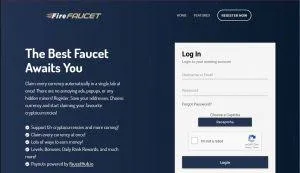
Read this first: FireFaucet.app is a guide site. We do not host a login form, we never ask for your password, and no legitimate guide site ever should. The only place your Fire Faucet credentials belong is the official firefaucet.win domain — typed by hand or opened from your own bookmark.
Before you type a password: the 10-second domain check
Nearly every "hacked faucet account" story we have investigated started the same way: a login form on the wrong domain. The lookalikes are good — same dark layout, same flame logo, sometimes a valid HTTPS padlock (padlocks prove encryption, not honesty). Your checklist, every single time:
- Read the address bar, not the page. The registrable domain must be exactly
firefaucet.win— not firefaucet-win.com, not firefaucet.win.login-verify.xyz, not f1refaucet.win. - Never log in from links in Telegram, Discord or YouTube comments. That is where 90% of phishing traffic originates. Type it or bookmark it.
- Be suspicious of urgency. "Your balance will be deleted in 24 hours — verify now" is a phishing script, not how reward platforms talk.
- Unexpected password prompts mid-session after clicking a shortlink ad? Close the tab and reopen the site from your bookmark. Ad chains love fake session-expired screens.
Registering an account: the 5-minute hardened setup
-
Open the official domain manually
Type firefaucet.win, check the spelling, bookmark it. This bookmark is now the only door you use.
-
Pick the right email
Use a real mailbox you control long-term — payouts and password resets depend on it. Best practice: a dedicated "rewards" email, separated from banking and exchanges, with 2FA enabled on the mailbox itself.
-
Generate a unique password
Password manager, 20+ random characters, used nowhere else. Faucet databases are breached more often than bank databases; assume your faucet password will leak someday and make sure it unlocks nothing else.
-
Verify the email
The confirmation link activates withdrawals — per the official site, a verified email is the only identity requirement; there is no KYC.
-
Do the security lap
Open account settings and switch on everything defensive the platform offers. Two minutes now beats a support ticket titled "my balance disappeared" later.
Logging in day-to-day without friction
Once the account exists, your daily flow should be boring: bookmark → session → claim. A few field-tested habits keep it that way. Let your password manager autofill — it refuses to fill credentials on a wrong domain, which makes it a free phishing detector. Keep the login session on your personal devices only; on a shared or internet-café computer, use private browsing and log out when done. And if you set up the home-screen shortcut on mobile, the persistent session means you will rarely type the password at all — which is exactly how phishers starve.
Common login problems and their boring fixes
| Symptom | Usual cause | Fix |
|---|---|---|
| Verification email never arrives | Spam filtering, disposable-email domain | Check spam/promotions, request resend, switch to a mainstream mailbox |
| Captcha loops forever | VPN/proxy IP with bad reputation | Disable the VPN — reward platforms flag datacenter IPs aggressively |
| "Account suspended" at login | Multi-account or automation flags | Contact official support; if you ran two accounts, expect no mercy |
| Password rejected after a leak scare | Forced reset by the platform | Use the reset flow via your registered email, then rotate the password |
| Session drops on every visit | Browser wipes cookies / privacy extensions | Whitelist the official domain in your cookie-cleaner settings |
One account, one human — the rule that saves balances
It deserves its own section because it kills more balances than every hacker combined. Reward platforms fingerprint devices, IP ranges and withdrawal wallets. Two accounts claiming from one kitchen table look identical to one fraudster with a script — and the ban usually lands at withdrawal time, when it hurts most. If your circumstances are genuinely shared (family, dorm, campus Wi-Fi), read the official terms before registering a second account, and never cross-fund the same wallet from both.
Never, under any circumstances, "verify" your account by sending crypto somewhere, sharing a screenshot of your seed phrase, or installing remote-access software for a "support agent" from Telegram. Real support never asks for any of those. Anyone who does is stealing from you in real time.
Already registered? Put a real bonus behind your next sign-up
FREECRYPTOOur partner exchange credits a 100 USDC trading-fee bonus once your first deposit clears — it sits in your reward center for 30 days, then expires. Enter the code when you create the account.
Bonus terms are set by the exchange and may change; check the reward center for current conditions.
Frequently asked questions
Where is the real Fire Faucet login page?
The only legitimate place to sign in is the official firefaucet.win domain. Type it manually or use your own bookmark. This site is an independent guide and does not have, and will never have, a login form — never enter your Fire Faucet password anywhere but the official domain.
What do I need to register a Fire Faucet account?
A working email address and a strong unique password. According to the official site, no KYC or ID documents are required — email verification is enough to claim and withdraw.
I am not receiving the verification email. What now?
Check the spam and promotions folders first, then request a resend. Gmail aliases and disposable-email domains are sometimes filtered by reward platforms, so a plain mailbox works best.
Can I create a second account for my family member on the same Wi-Fi?
Risky. Faucets treat same-IP, same-device-fingerprint accounts as multi-accounting, which is banned and typically punished with a balance wipe. If two people in one household genuinely use the platform, read the official rules first and never share wallets or sessions.
I forgot my password. Is my crypto gone?
No — use the password reset flow on the official site, delivered to your registered email. This is exactly why the email account backing your faucet login deserves 2FA of its own.
Next steps
- Auto claim guide — set up the ACP engine on day one.
- Withdrawal guide — plan your first cash-out before you grind.
- Promo codes — free boosts for fresh accounts.